Cover of "The Ins and Outs of Webcomics" by "Jey Pawlik". Black and white illustration with halftones of Jey, a nonbinary person with short cropped black hair and big rectangular glasses running through a panel in a comic page. The background is made up of many blank comic pages with panel layouts on them.

Ins and Outs of Webcomics REMASTER Cover

Ins and Outs of Webcomics REMASTER Cover published on No Comments on Ins and Outs of Webcomics REMASTER Cover

Page 1 of 11, be sure to click ahead for the next page – which is already up! I was inspired while teaching my students to come back to this comic from 2020 and remake it with new up-to-date info & art. I redrew and re-lettered the entire comic and I’m quite pleased with it.… Continue reading Ins and Outs of Webcomics REMASTER Cover
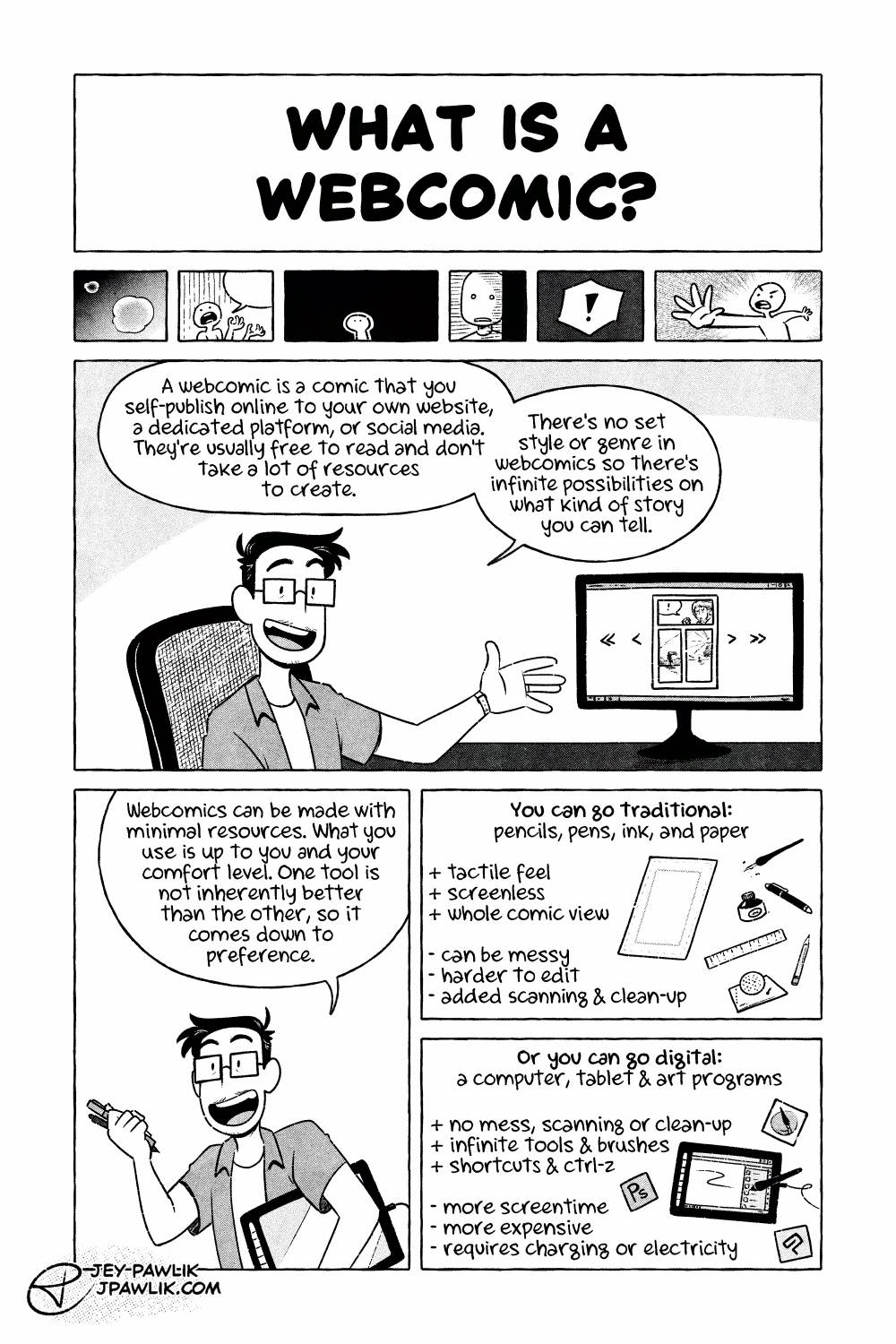
The Ins and Outs of Webcomics, comic page. "What is a webcomic?" 6 small panels show various ways people draw comic panels; steamy bubbles, speech bubbles, beat panels, hatching, sound effects, and motion. Jey is sat at a computer and gestures to a comic page on the monitor while saying "A webcomic is a comic that you self-publish online to your own website, a dedicated platform, or social media. They're usually free to read and don't take a lot of resources to create. There's no set style or genre in webcomics so there's infinite possibilities on what kind of story you can tell." Jey says "Webcomics can be made with minimal resources. What you use is up to you and your comfort level. One tool is not inherently better than the other, so it comes down to preference." While holding pens and a drawing display under their arm. "You can go traditional: pencils, pens, ink, and paper" the panel shows these items next to a pros and cons list. "Pros: tactile feel, screenless, whole comic vie." "Cons: can be messy, harder to edit, added scanning and clean-up" "Or you can do digital: a computer, tablet, & art programs" showing these next to the pros and cons list. "Pros: no mess, scanning, or clean-up, infinite tools & brushes, shortcuts & ctrl-z" "Cons: more screentime, more expensive, requires charging or electricity"

Ins and Outs of Webcomics REMASTER – 1

Ins and Outs of Webcomics REMASTER – 1 published on No Comments on Ins and Outs of Webcomics REMASTER – 1

Page 2 of 11, don’t forget to check out the previous page. Page 1, what is a webcomic? A quick overview. Honestly a webcomic can be anything you want it to be with whatever tools and experience you have available to you. The best thing about webcomics IS that they can be anything. Want to… Continue reading Ins and Outs of Webcomics REMASTER – 1

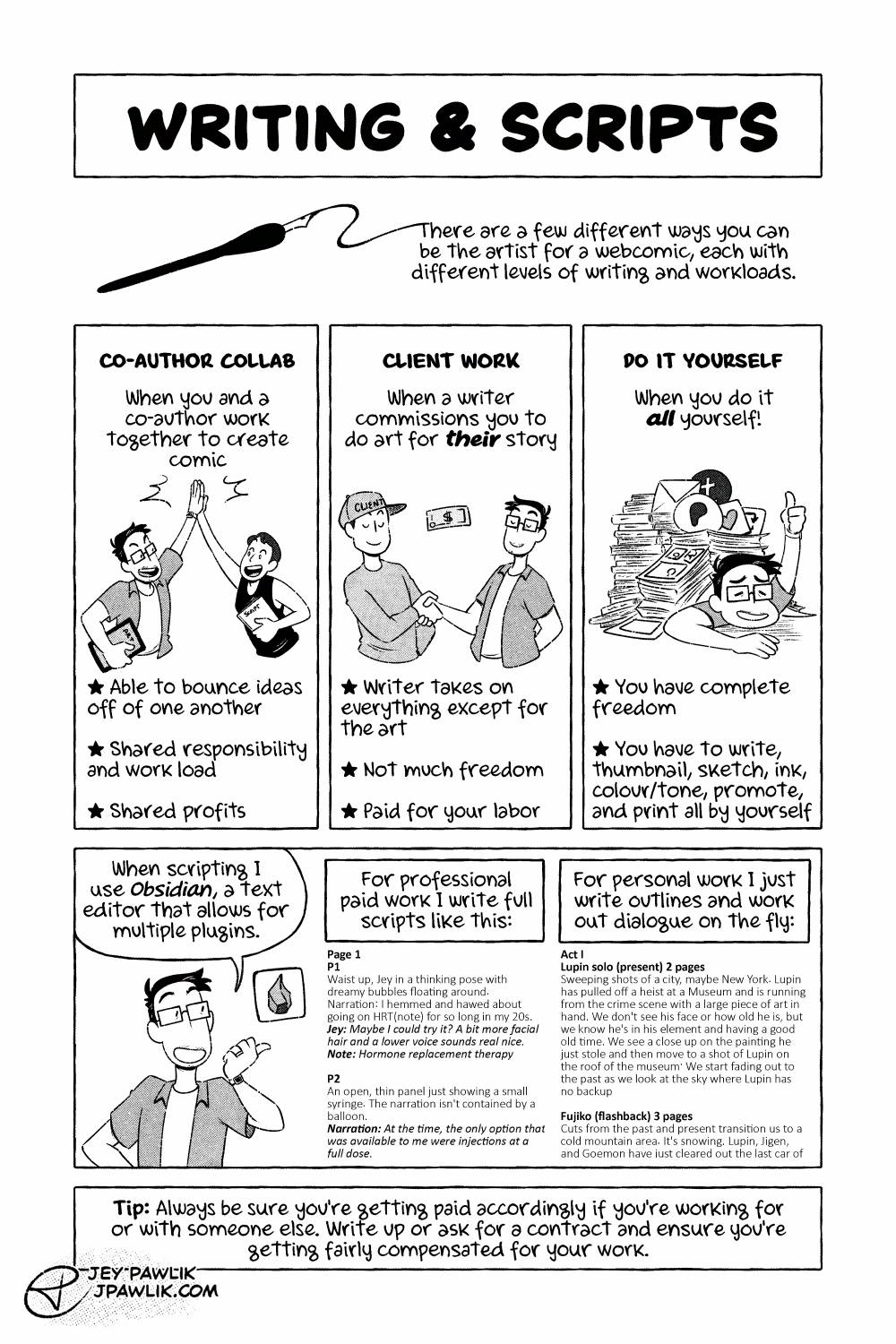
The Ins and Outs of Webcomics, comic page. "Writing & Scripts" a dip pen writes out the text "There are a few different ways you can be the artist for a webcomic, each with different levels of writing and workloads." Three consecutive panels in a row showing the different ways to be the artist. "Co-Author Collab, when you and a co-author work together to create comics" where Jey and Max are in a high five and carrying different workloads. Bullet points read "Able to bounce ideas off one another" "Shared responsibility and work load" "Shared profits" "Client Work, when a writer commissions you to do art for their story." Jey is shaking hands with a writer and money is being passed over. Bullet points read "Writer takes on everyone except for the art" "Not much freedom" "Paid for your labor" "Do it yourself, when you do it all yourself." We see Jey buried in the work load of it all but giving a weary thumbs up. Bullet points read "You have complete freedom" "You have to write, thumbnail., sketch, ink, colour/tone, promote and print all by yourself" Jey gestures to two samples of their scripts and says "When scripting I use Obsidian, a text editor that allows for multiple plugins." A thorough script is shown with the text "For professional paid work I write full scripts." An outline is shown with the text "For personal work I just write outlines and work out dialogue on the fly." A text written tip is at the bottom of the page that reads "Tip: Always be sure you're getting paid accordingly if you're working for or with someone else. Write up or ask for a contract and ensure you're getting fairly compensated for your work."

Ins and Outs of Webcomics REMASTER – 2

Ins and Outs of Webcomics REMASTER – 2 published on 3 Comments on Ins and Outs of Webcomics REMASTER – 2

Page 2 and what scripting and writing a webcomic can look like. I’ve done all three methods here and all have their pros and cons. I switched this page around quite a bit and added what scripting looks like for me when I do it. I’m quite pleased with this new version of the page!… Continue reading Ins and Outs of Webcomics REMASTER – 2

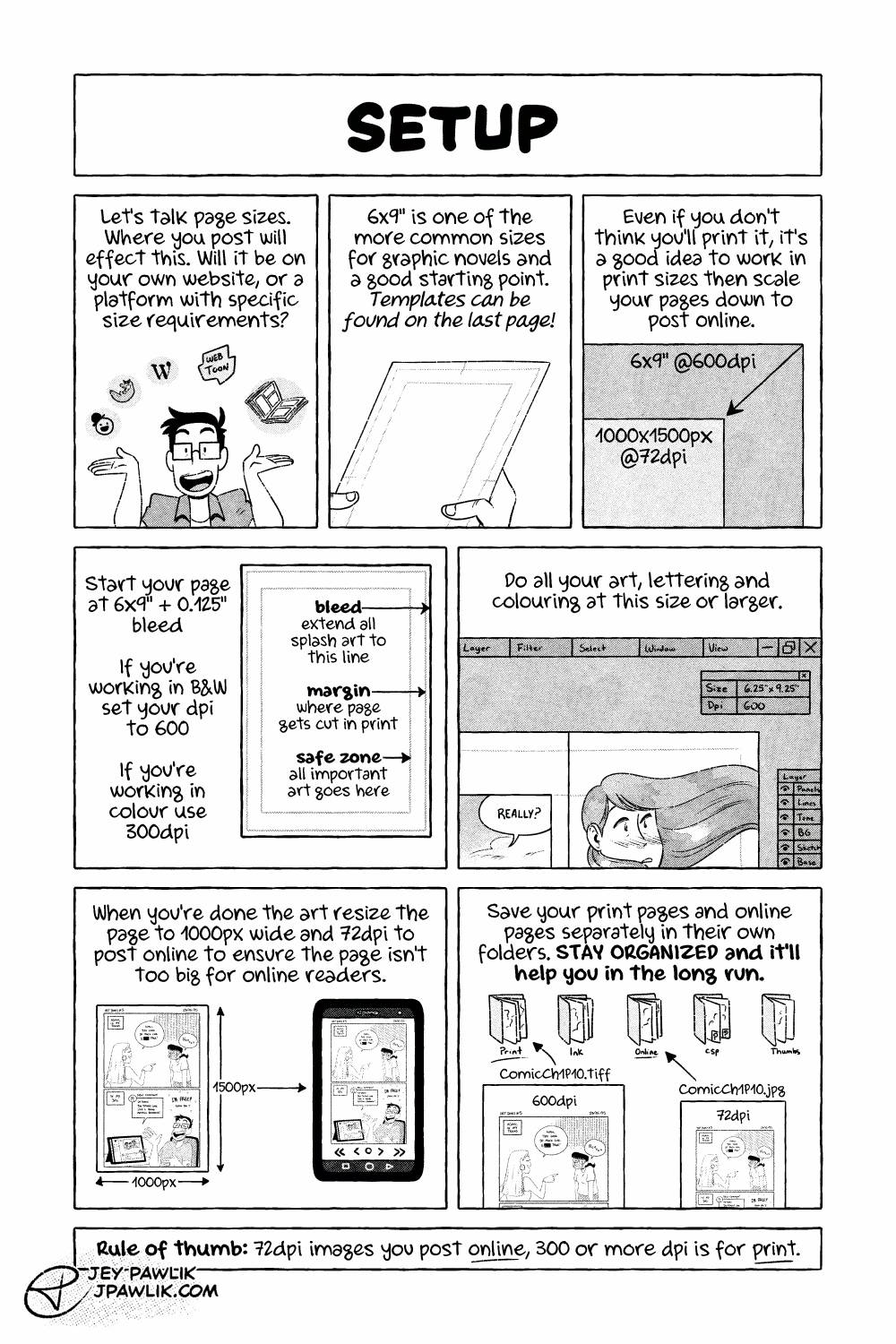
The Ins and Outs of Webcomics, comic page. "Setup" Jey gestures to multiple comic hosting platform logos: tapas, comicfury, wordpress, webtoon, and also physical books. "Let's talk page sizes. Where you post will effect this. Will it be on your own website, or a platform with specific requirements?" Jey holds a piece of paper with a template on it, showing margins and bleed. "6x9 inches is one of the more common sizes for graphic novels and a good starting point. Templates can be found on the last page (or in the description of this page)" An image showing the size different between a 6x9" @600dpi page and a 1000x1500px @72dpi image. "Even if you don't think you'll print it, it's a good idea to work in print sizes then scale your page down to post online." "Start your page at 6x9in plus 0.125in bleed." "If you're working in B&W set your dpi and 600." "If you're working in colour use 300dpi." A sample of the 6x9" template. "Bleed, extend all splash art to this line" this points to the bleed on the template. "Margin, where page gets cut in print" pointing to the margin lines. "Safe zone, all important art goes here." "Do all your art, lettering, and colouring at this size or larger." an illustration of a digital art program, showing the size of the page as 6.25x9.25" and a dpi of 600. The art is being worked on at this size. "When you're done the art resize the page to 1000px wide and 72dpi to post online to ensure the page isn't too big for online readers." Showing the 1000px wide comic page fitting well on a phone screen. "Save your print pages and online pages separately in their own folders. Stay organized and it'll help you in the long run." An illustration of different folders on a computer: Print, Ink, Online, CSP, and thumbs. The 600dpi image being put in the "Print" folder and the 72dpi image sent to the "Online" folder. "Rule of thumb: 72dpi images you post online, 300 or more dpi is for print."

Ins and Outs of Webcomics REMASTER – 3

Ins and Outs of Webcomics REMASTER – 3 published on No Comments on Ins and Outs of Webcomics REMASTER – 3

Page 3 and we’re talking a bit about set-up. You can find my 6×9″ templates that I mention right here! Want to buy a digital or physical copy? Check out the Topaz Comics Shop! Or you can also grab the PDF on Patreon, or itch.io Want to see sketches, thumbnails, and comic pages early? Join… Continue reading Ins and Outs of Webcomics REMASTER – 3

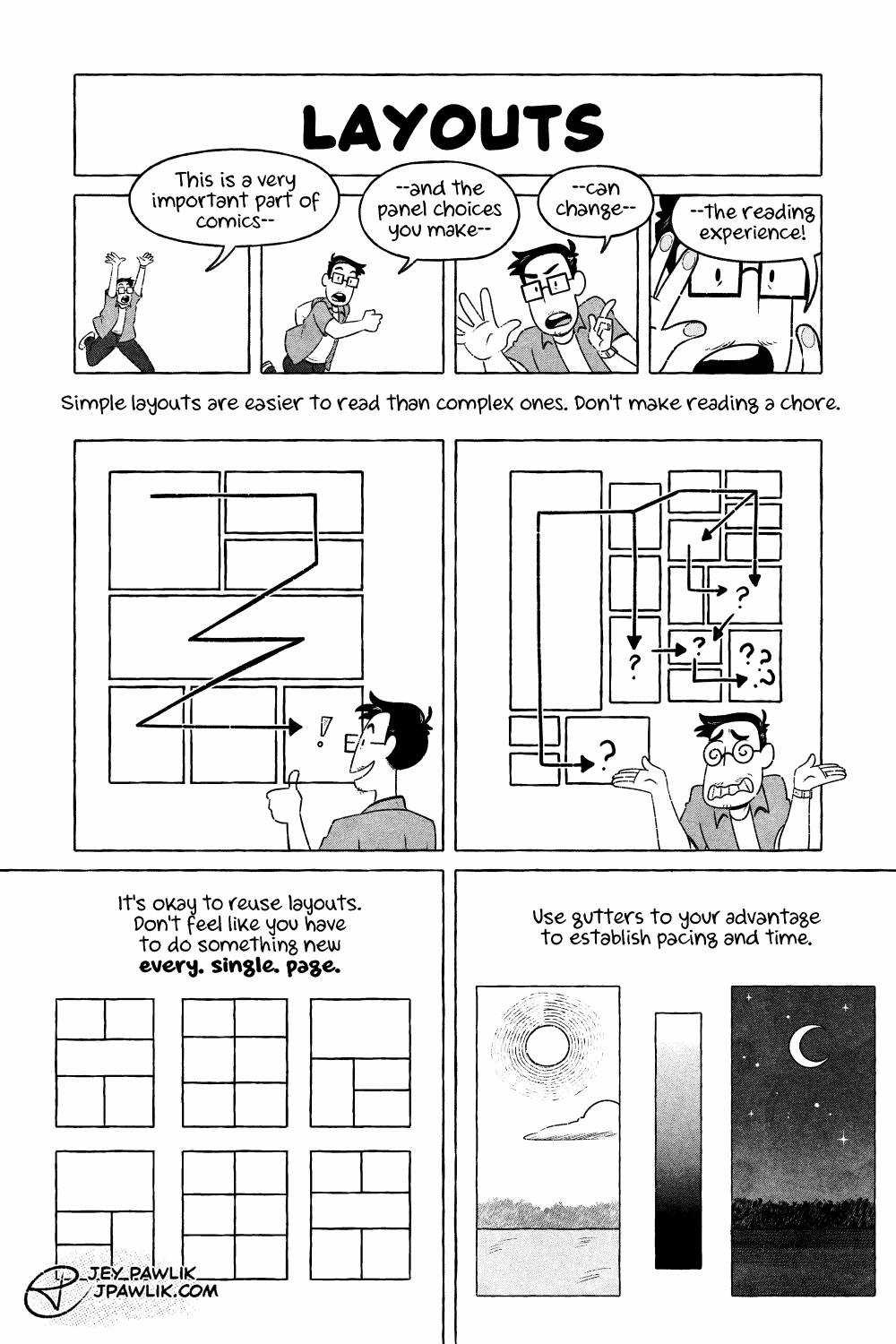
The Ins and Outs of Webcomics, comic page. "Layouts" Four panels where Jey starts off far away and gradually gets closer until their hands are pressed up against the panel. As they get closer they say "This is a very important part of comics-- and the panel choices you make-- can change-- the reading experience!" "Simple layouts are easier to read than complex ones. Don't make reading a chore." Jey is giving a thumbs up beside a simple, easy to read comic page where the eye zig zags through the panels with ease. Jey is dizzy and shrugging confused beside a complex comic page where the eye isn't sure which panel comes next. "It's okay to reuse layouts. Don't feel like you have to do something new every. single. page." Three comic layout examples are shown, and then the same three layouts are shown below just in a different order. "Use gutters to your advantage to establish pacing and time." A panel of a sunny day, with a big gutter between it and a smaller panel with a light to dark gradient, another big gutter, and a panel with the moon and stars in the night sky.

Ins and Outs of Webcomics REMASTER – 4

Ins and Outs of Webcomics REMASTER – 4 published on No Comments on Ins and Outs of Webcomics REMASTER – 4

Page 4, let’s talk layouts! I always struggle with big artsy layouts. Where is my eye supposed to go? Sometimes simple is better. Want to buy a digital or physical copy? Check out the Topaz Comics Shop! Or you can also grab the PDF on Patreon or itch.io Want to see sketches, thumbnails, and comic… Continue reading Ins and Outs of Webcomics REMASTER – 4

Ins and Outs of Webcomics REMASTER – 5

Ins and Outs of Webcomics REMASTER – 5 published on No Comments on Ins and Outs of Webcomics REMASTER – 5

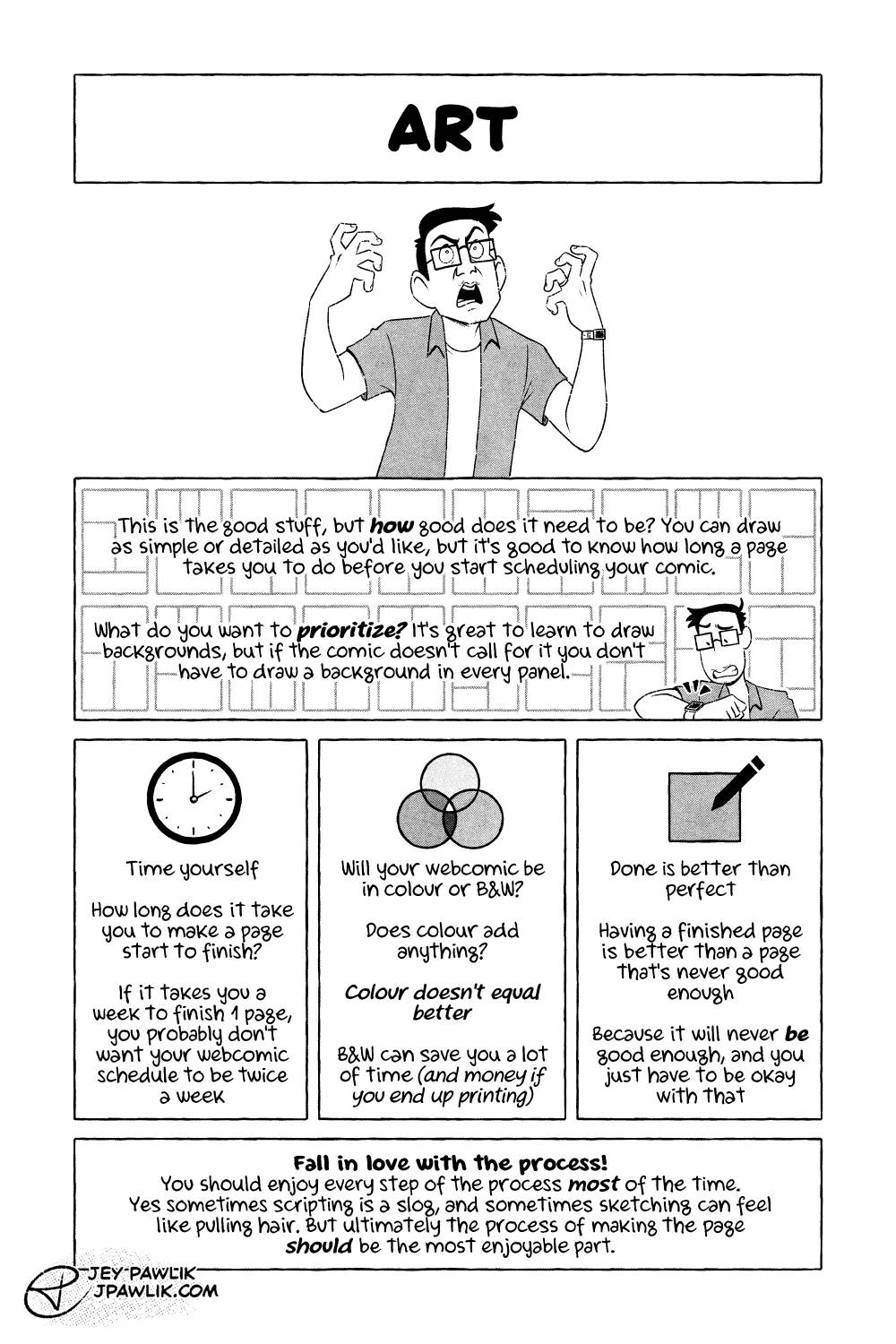
Page 5 and let’s get to the good stuff. The stuff you WANT to do! Want to buy a digital or physical copy? Check out the Topaz Comics Shop! Or you can also grab the PDF on Patreon or itch.io Want to see sketches, thumbnails, and comic pages early? Join us on Patreon!

Ins and Outs of Webcomics REMASTER – 6

Ins and Outs of Webcomics REMASTER – 6 published on No Comments on Ins and Outs of Webcomics REMASTER – 6

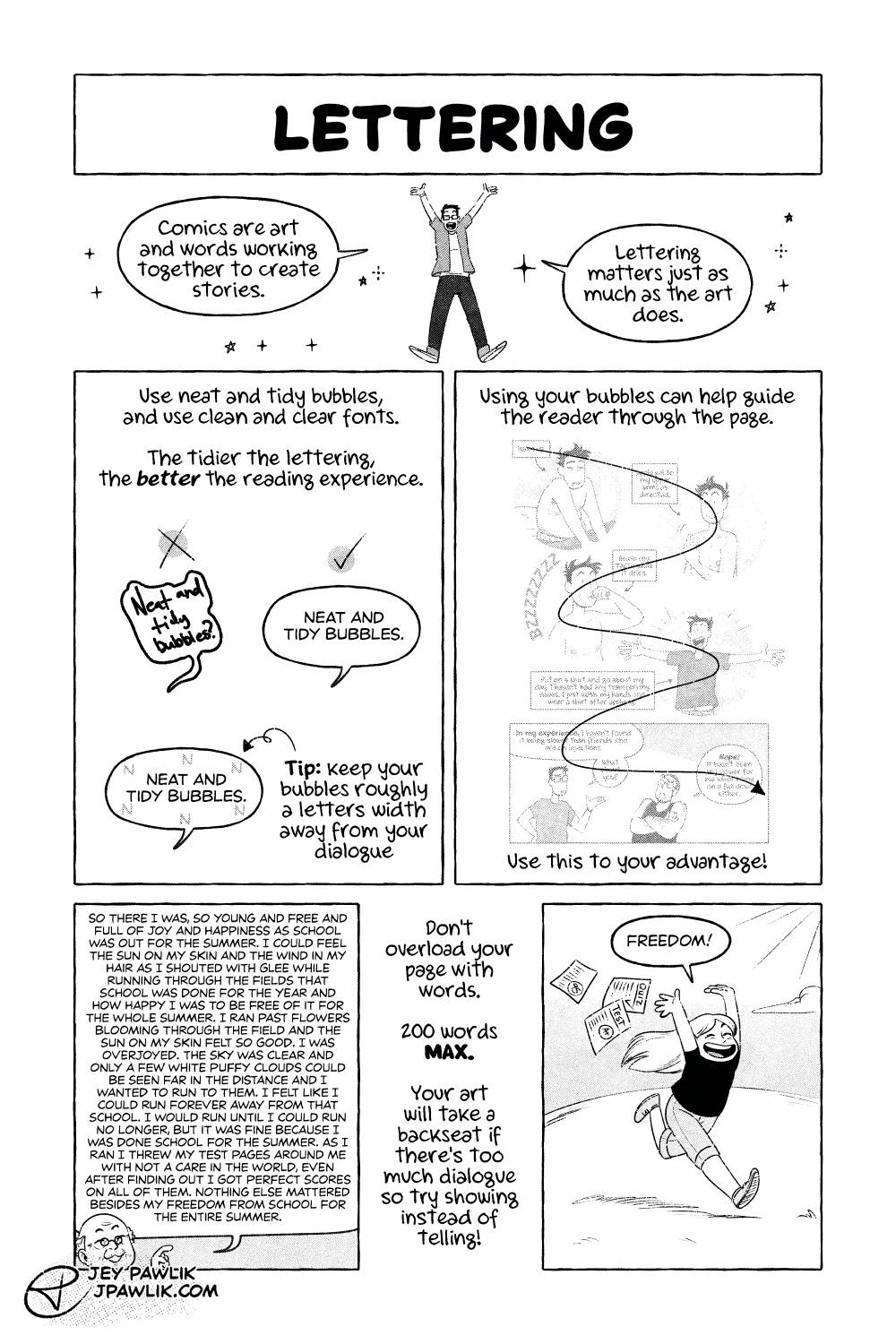
Page 6, and hey did you know lettering is actually SUPER IMPORTANT?! Don’t skimp on lettering and go read Nate Peikos’ book “The Essential Guide to Comic Lettering” already! Lettering is something I only started to take more seriously around six years ago and y’all. IT’S SO IMPORTANT. It can honestly make or break a… Continue reading Ins and Outs of Webcomics REMASTER – 6

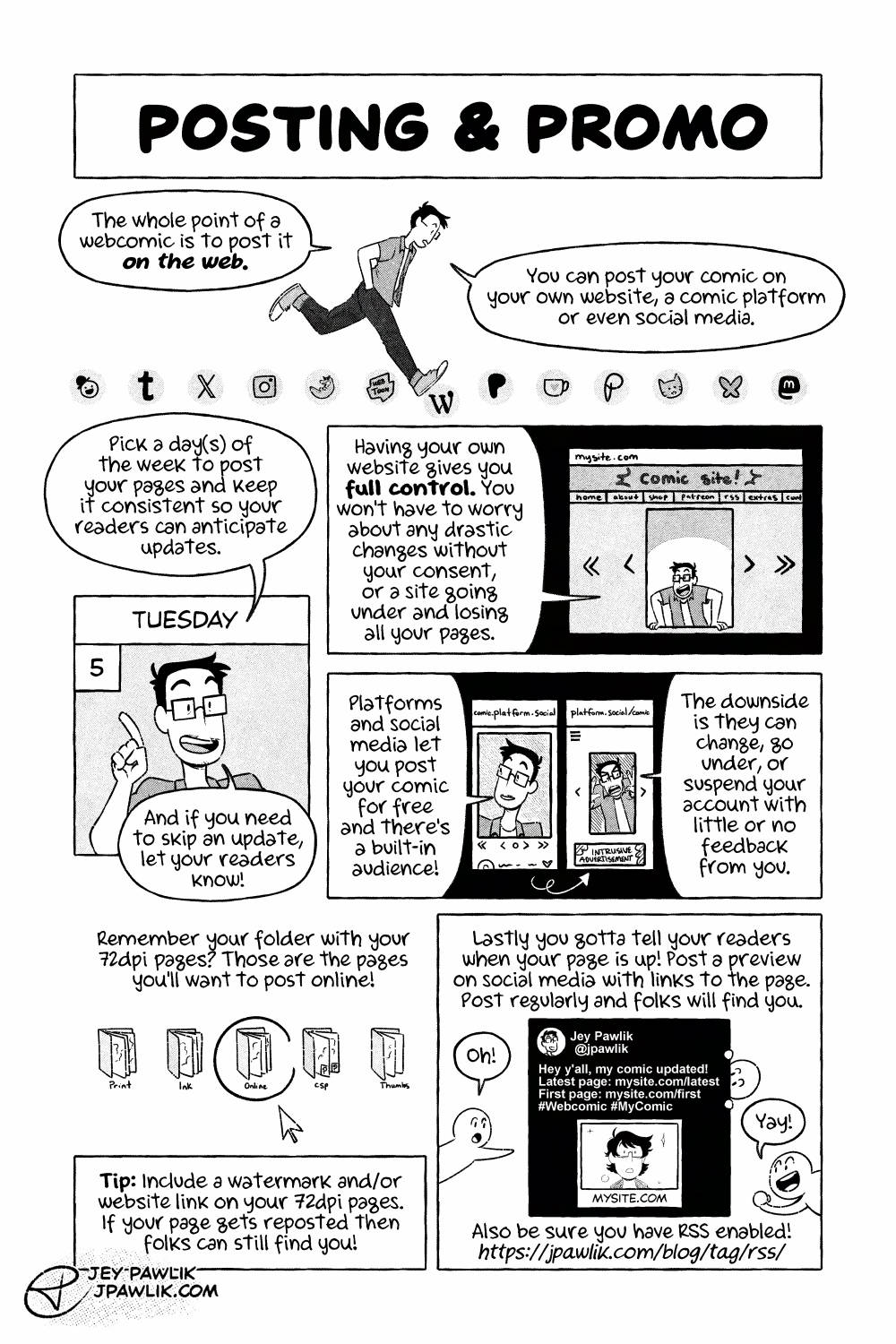
The Ins and Outs of Webcomics comic page "Posting & Promo". Jey is walking over a string of bubbles with various social media platform logos as they say "The whole point of a webcomic is to post it on the web. You can post your comic on your own website, a comic platform, or even social media." Jey is framed by the day box from a calendar that says Tuesday, 5. Jey holds their finger up to point at the date and says "Pick a day(s) of the week to post your pages and keep it consistent so your readers can anticipate updates. And if you need to skip an update, let your readers know!" Much smaller, Jey is very tiny in an example of a self-hosted comic site. They look excited and are saying "Having your own website gives you full control. You won't have to worry about drastic changes without your consent, or a site going under and losing all your pages." Now in a mobile layout, Jey is framed in a social media post with clear navigation a description and url looking like comic.platform.social and Jey says "Platforms and social media let you post your comic for free and there's a built-in audience!" but next to this, the social media site has completely changed, the image section is much smaller, the url has changed to platform.social/comic, the navigation is harder to understand and a super intrusive ad is covering the description. Jey complains "The downside is they can change, go under, or suspend your account with little or no feedback from you." We see the same row of file folders we saw on page 3. Narration reads "Remember your folder with your 72dpi pages? Those are the pages you'll want to post online!" A mouse hovers over the folder titled "Online". Narration reads "Tip: Include a watermark and/or website link on your 72dpi pages. If your page gets reposted then folks can still find you!" "Lastly you gotta tell your readers when your page is up! Post a preview on social media with links to the page. Post regularly and folks will find you." Readers flock to the social media post where Jey posts a crop of the comic page and writes "Hey y'all, my comic updated! Latest page: mysite.com/latest First page: mysite.com/first with the hashtags Webcomic and MyComic" Narration reads "Also be sure you have RSS enabled! https://jpawlik.com/blog/tag/rss"

Ins and Outs of Webcomics REMASTER – 7

Ins and Outs of Webcomics REMASTER – 7 published on No Comments on Ins and Outs of Webcomics REMASTER – 7

Page 7, posting and promo has become a bit of a discussion point as of late with social media being what it is. So you should go check out my talk and comic on RSS~ Want to buy a digital or physical copy? Check out the Topaz Comics Shop! Or you can also grab the… Continue reading Ins and Outs of Webcomics REMASTER – 7

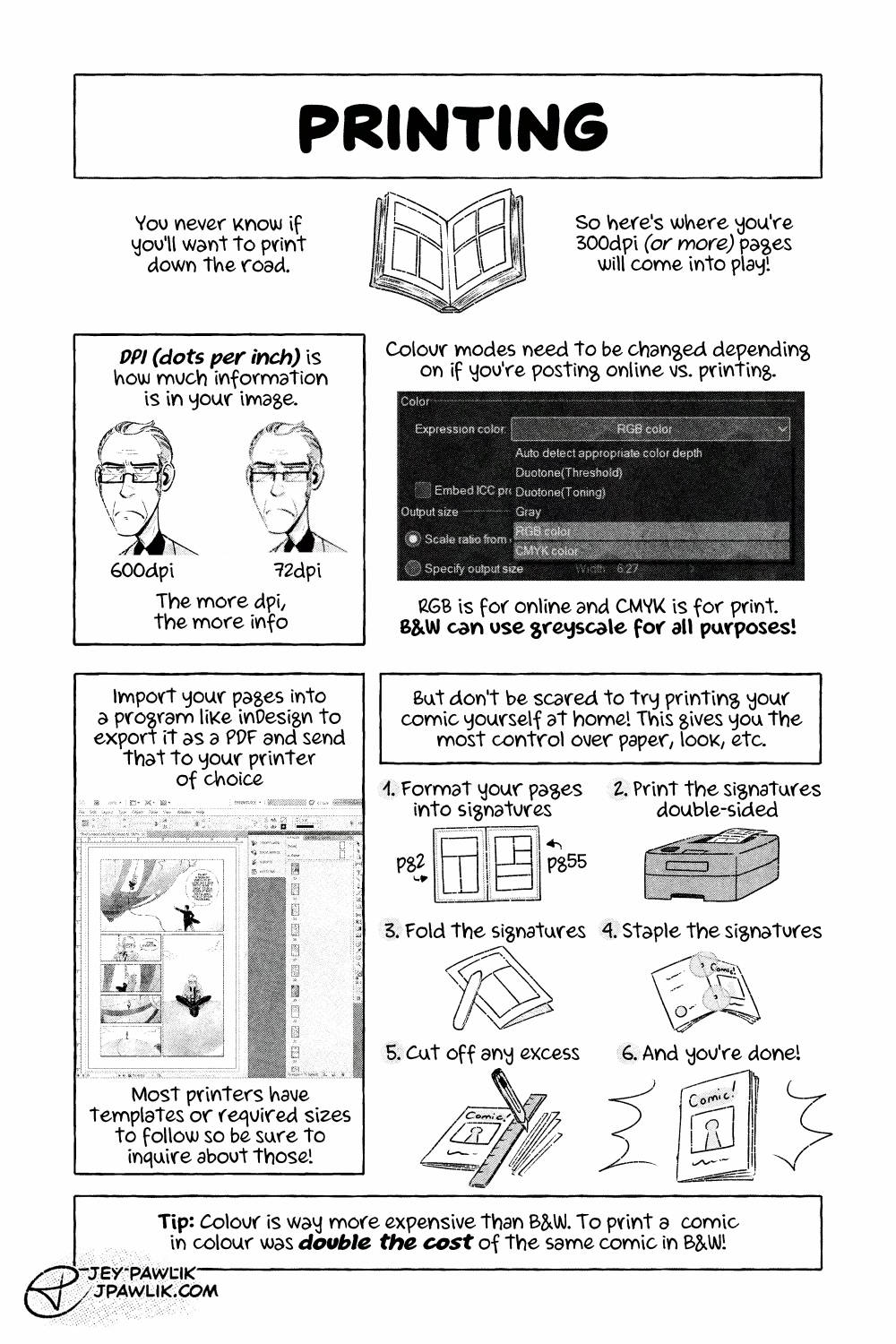
The Ins and Outs of Webcomics comic page "Printing" an illustration of an open book. "You never know if you'll want to print down the road. So here's where you're 300dpi (or more) pages will come into play." An example image of 600dpi versus 72dpi using the same illustration. "DPI (Dots per inch) is how much information is in your image. The more DPI, the more info." A screenshot of the colour interface in Clip Studio Paint, showing where one can find RGB, CMYK, and Gray modes. "Colour modes need to be changed depending on if you're posting online vs. printing. RBG is for online and CMYK is for print. B&W can use greyscale for all purposes!" "Import your pages into a program like inDesign to export it as a PDF and send that to your printer of choice." A screenshot of a comic page in inDesign. "Most printers have templates or required sizes to follow so be sure to inquire about those!" "But don't be scared to try printing your comic yourself at home! This gives you the most control over paper, look, etc." "1. Format your pages into signatures" example of a signature with pg 2 on the left and pg 55 on the right. "2. Print the signatures double-sided" showing a little laser printer printing out the pages. "3. Fold the signatures" a bone folder running along the fold of the signature. "4. Staple the signatures" a sample of where to staple the booklet. "5. Cut off any excess" Using a ruler and an exacto-knife cutting the excess off the booklet. "6. And you're done!" a finished home-made comic. "Tip: Colour is way more expensive than B&W. To print a comic in colour was double the cost of the same comic in B&W!"

Ins and Outs of Webcomics REMASTER – 8

Ins and Outs of Webcomics REMASTER – 8 published on No Comments on Ins and Outs of Webcomics REMASTER – 8

Page 8, I really like printing and I could do a whole comic on printing alone but always remember 72dpi images are for web and 300dpi or more is for print!!! Never try and print a 72dpi image okay? Just work in print sizes and you’ll never be floundering to redraw things when you do… Continue reading Ins and Outs of Webcomics REMASTER – 8

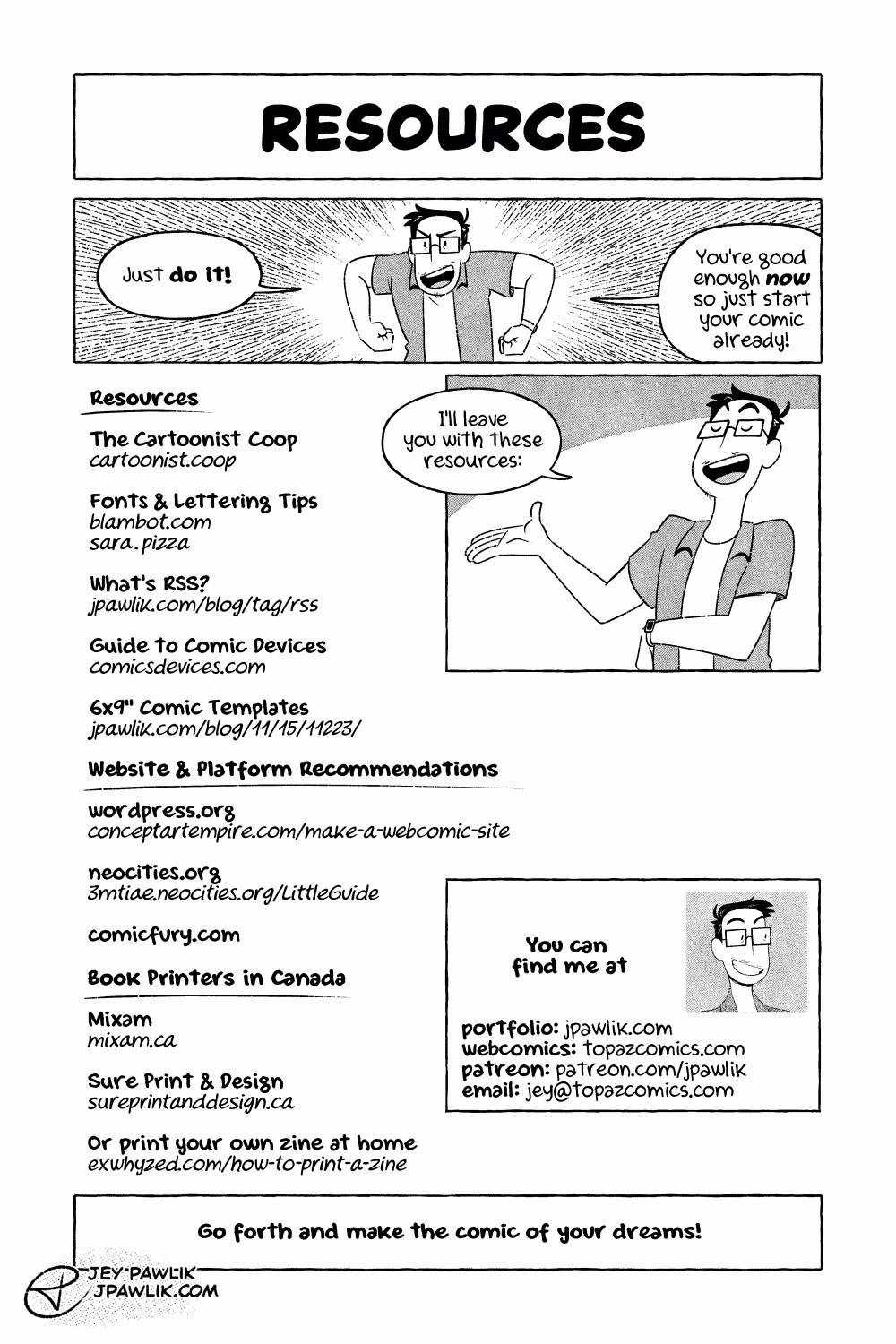
The Ins and Outs of Webcomics comic page "Resources" and Jey in a determined pose saying "Just do it! You're good enough now so just start your comic already!" Jey gestures to a list and says "I'll leave you with these resources." The list reads as follows: The Cartoonist Coop cartoonist.coop - Fonts & Lettering Tips blambot.com sara.pizza - What's RSS? jpawlik.com/blog/tag/rss - Guide to Comic Devices comicdevices.com - 6"x9" Comic Templates jpawlik.com/blog/11/15/11223 - Website and Platform Recommendations wordpress.org conceptartempire.com/make-a-webcomic-site - neocities.org 3mtiae.neocities.org/LittleGuide - comicfury.com - Book Printers in Canada mixam.ca - sureprintanddesign.ca - or print your own zine at home exwhyzed.com/how-to-print-a-zine You can find me at: portfolio jpawlilk.com - webcomics topazcomics.com - patreon patreon.com/jpawlik - email jey@topazcomics.com The bottom of the page reads "Go forth and make the comic of your dreams!"

Ins and Outs of Webcomics REMASTER – 9

Ins and Outs of Webcomics REMASTER – 9 published on 2 Comments on Ins and Outs of Webcomics REMASTER – 9

Edit: if you saw this last week, no you didn’t! Last page of my Ins and Outs of Webcomics REMASTER! I really enjoyed working on this for my students and printing it for them. I hope you also found it helpful. Want to buy a digital or physical copy? Check out the Topaz Comics Shop!… Continue reading Ins and Outs of Webcomics REMASTER – 9