
Skip to content

Document Header

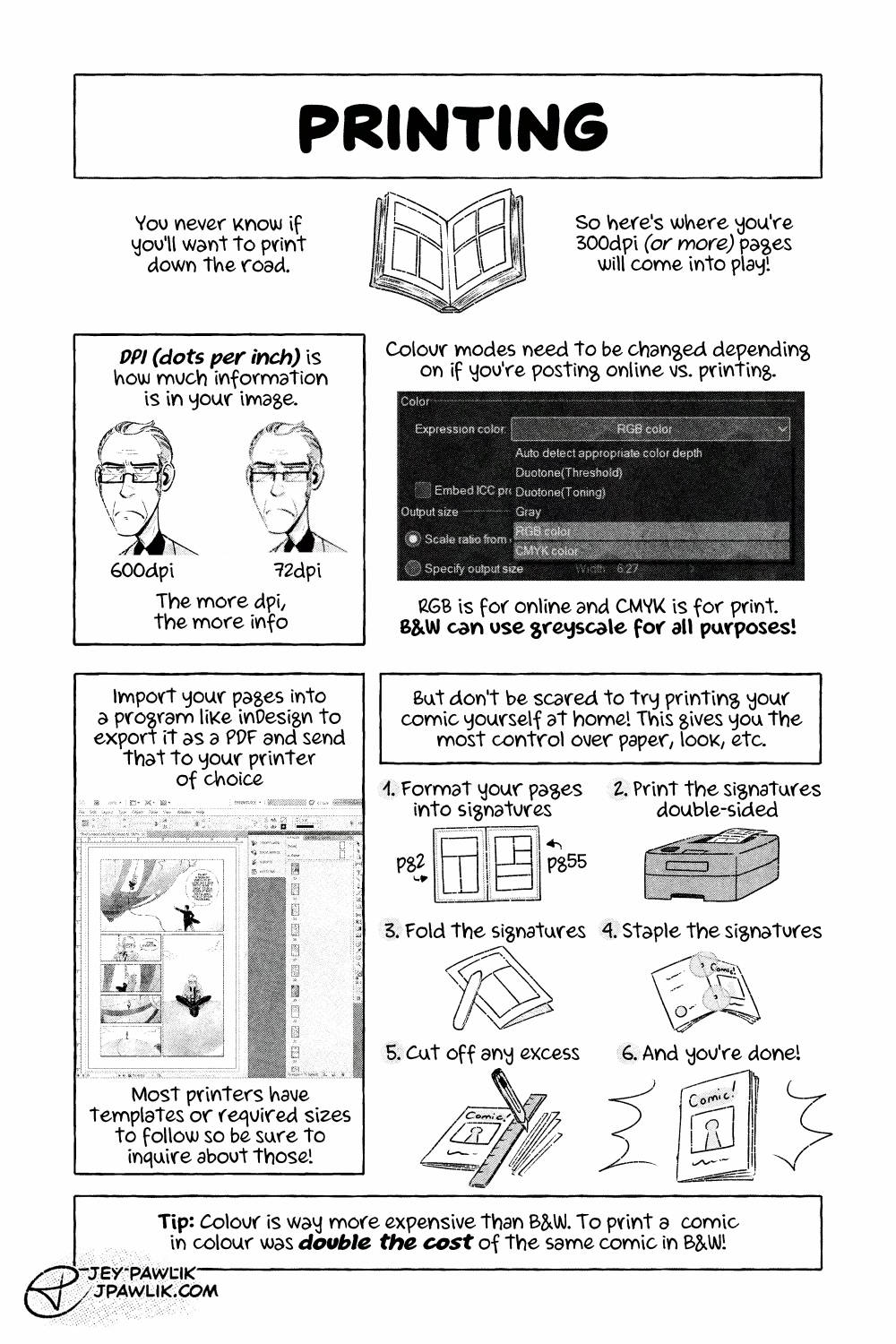
The Ins and Outs of Webcomics comic page "Printing" an illustration of an open book. "You never know if you'll want to print down the road. So here's where you're 300dpi (or more) pages will come into play." An example image of 600dpi versus 72dpi using the same illustration. "DPI (Dots per inch) is how much information is in your image. The more DPI, the more info." A screenshot of the colour interface in Clip Studio Paint, showing where one can find RGB, CMYK, and Gray modes. "Colour modes need to be changed depending on if you're posting online vs. printing. RBG is for online and CMYK is for print. B&W can use greyscale for all purposes!" "Import your pages into a program like inDesign to export it as a PDF and send that to your printer of choice." A screenshot of a comic page in inDesign. "Most printers have templates or required sizes to follow so be sure to inquire about those!" "But don't be scared to try printing your comic yourself at home! This gives you the most control over paper, look, etc." "1. Format your pages into signatures" example of a signature with pg 2 on the left and pg 55 on the right. "2. Print the signatures double-sided" showing a little laser printer printing out the pages. "3. Fold the signatures" a bone folder running along the fold of the signature. "4. Staple the signatures" a sample of where to staple the booklet. "5. Cut off any excess" Using a ruler and an exacto-knife cutting the excess off the booklet. "6. And you're done!" a finished home-made comic. "Tip: Colour is way more expensive than B&W. To print a comic in colour was double the cost of the same comic in B&W!"

Ins and Outs of Webcomics REMASTER – 8

Ins and Outs of Webcomics REMASTER – 8 published on No Comments on Ins and Outs of Webcomics REMASTER – 8

Page 8, I really like printing and I could do a whole comic on printing alone but always remember 72dpi images are for web and 300dpi or more is for print!!! Never try and print a 72dpi image okay? Just work in print sizes and you’ll never be floundering to redraw things when you do decide to print your comic.

Want to buy a digital or physical copy? Check out the Topaz Comics Shop!

Or you can also grab the PDF on Patreon, or itch.io

Want to see sketches, thumbnails, and comic pages early? Join us on Patreon!

Leave a Reply

Your email address will not be published. Required fields are marked *