
Skip to content

Document Header

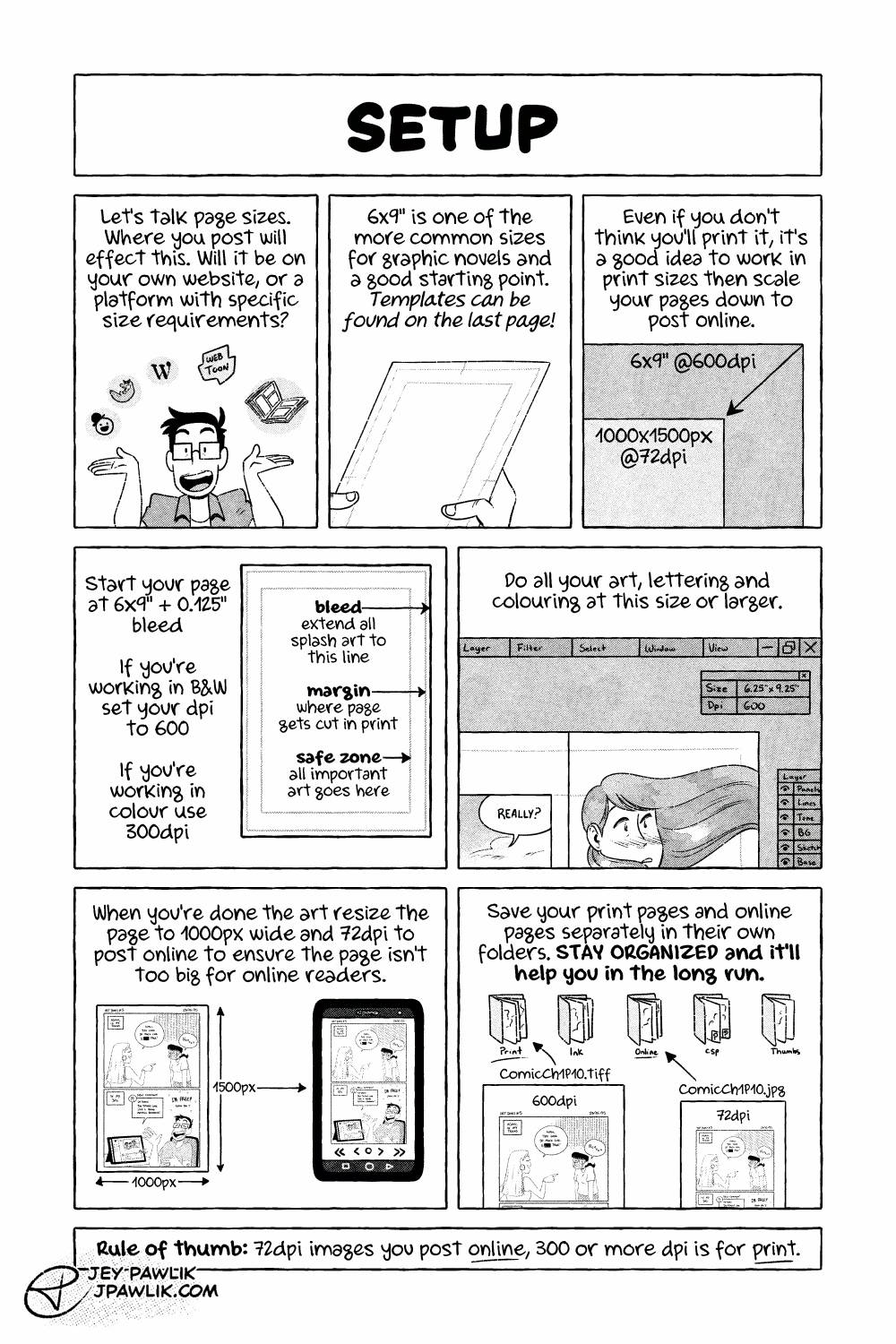
The Ins and Outs of Webcomics, comic page. "Setup" Jey gestures to multiple comic hosting platform logos: tapas, comicfury, wordpress, webtoon, and also physical books. "Let's talk page sizes. Where you post will effect this. Will it be on your own website, or a platform with specific requirements?" Jey holds a piece of paper with a template on it, showing margins and bleed. "6x9 inches is one of the more common sizes for graphic novels and a good starting point. Templates can be found on the last page (or in the description of this page)" An image showing the size different between a 6x9" @600dpi page and a 1000x1500px @72dpi image. "Even if you don't think you'll print it, it's a good idea to work in print sizes then scale your page down to post online." "Start your page at 6x9in plus 0.125in bleed." "If you're working in B&W set your dpi and 600." "If you're working in colour use 300dpi." A sample of the 6x9" template. "Bleed, extend all splash art to this line" this points to the bleed on the template. "Margin, where page gets cut in print" pointing to the margin lines. "Safe zone, all important art goes here." "Do all your art, lettering, and colouring at this size or larger." an illustration of a digital art program, showing the size of the page as 6.25x9.25" and a dpi of 600. The art is being worked on at this size. "When you're done the art resize the page to 1000px wide and 72dpi to post online to ensure the page isn't too big for online readers." Showing the 1000px wide comic page fitting well on a phone screen. "Save your print pages and online pages separately in their own folders. Stay organized and it'll help you in the long run." An illustration of different folders on a computer: Print, Ink, Online, CSP, and thumbs. The 600dpi image being put in the "Print" folder and the 72dpi image sent to the "Online" folder. "Rule of thumb: 72dpi images you post online, 300 or more dpi is for print."

Ins and Outs of Webcomics REMASTER – 3

Ins and Outs of Webcomics REMASTER – 3 published on No Comments on Ins and Outs of Webcomics REMASTER – 3

Page 3 and we’re talking a bit about set-up. You can find my 6×9″ templates that I mention right here!

Want to buy a digital or physical copy? Check out the Topaz Comics Shop!

Or you can also grab the PDF on Patreon, or itch.io

Want to see sketches, thumbnails, and comic pages early? Join us on Patreon!

Leave a Reply

Your email address will not be published. Required fields are marked *